

Download Clean Google Calendar – Free, Secure & Open‑Source Calendar Enhancer
Overview
Keeping a busy schedule organized is a daily challenge for professionals, students, and anyone who relies on Google Calendar. While the native Google Calendar web app is powerful, its default layout can feel cluttered, especially when you juggle multiple calendars, recurring events, and time‑zone differences. Clean Google Calendar steps in as a free Chrome add‑on that reimagines the way you interact with your existing Google Calendar data.
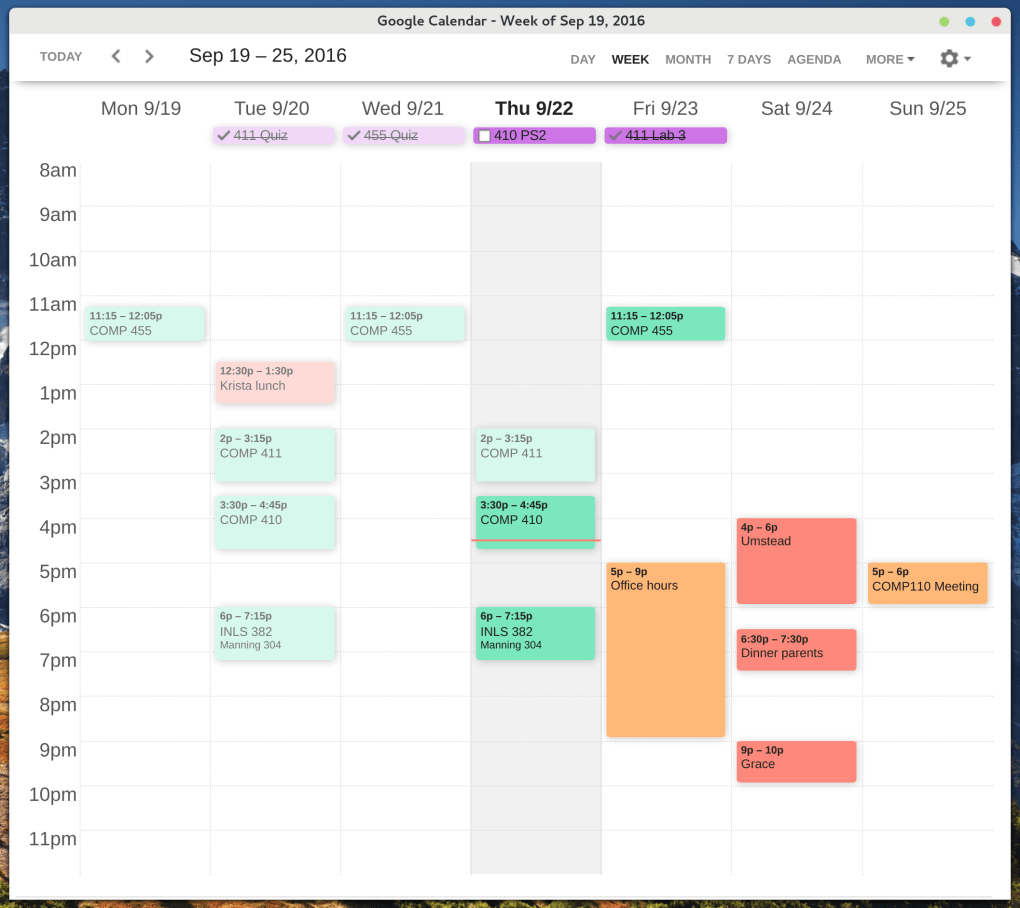
Built on open‑source principles, the tool does not replace your calendar; instead, it reads your current events through Google’s API and presents them in a cleaner, more intuitive interface that feels like a dedicated desktop application. The design focuses on readability, rapid navigation, and a minimalist aesthetic, helping you locate, edit, and create events with fewer clicks. Because it’s open source, the community continuously contributes improvements, bug fixes, and feature requests, ensuring the app stays up‑to‑date with the evolving Google ecosystem.
Whether you’re managing a corporate project timeline, coordinating family activities, or simply need a clearer view of your day‑to‑day appointments, Clean Google Calendar offers a secure, ad‑free experience that respects your data privacy while delivering a smoother workflow.
Key Features & Simple Installation
Feature Highlights
- Seamless Sync: Uses Google’s official API to pull all calendars, events, and reminders without creating duplicate data.
- Redesigned Interface: A clean, card‑based layout that prioritizes date visibility and reduces visual noise.
- One‑Click Event Editing: Open, modify, or delete events directly from the new view, mirroring the native experience.
- Multi‑Calendar Support: Color‑coded filters let you isolate personal, work, or shared calendars instantly.
- Open‑Source & Community Driven: Hosted on GitHub, the codebase welcomes contributions and transparent issue tracking.
- Offline Cache (Beta): Optional local storage allows quick read‑only access when internet connectivity is limited.
- Keyboard Shortcuts: Navigate days, weeks, or months using arrow keys for faster planning.
Installation & First‑Time Setup
Installing Clean Google Calendar is straightforward and designed for users of any technical level. Follow these steps to get started:
- Open the Chrome Web Store and search for “Clean Google Calendar.”
- Click Add to Chrome and confirm the permissions request (read‑only access to your Google Calendar data).
- After the extension installs, you’ll see a new icon next to the address bar. Click it to launch the app.
- You’ll be prompted to sign in with your Google account. The OAuth flow is handled securely by Google, and no credentials are stored locally.
- Once authenticated, the extension loads your calendars and displays them in the new interface. You can customize the view (day, week, month) from the settings gear in the top‑right corner.
- Optional: Visit the GitHub repository to enable the beta offline cache or contribute to the project.
The entire process takes less than two minutes, after which you can immediately enjoy a cleaner, faster calendar experience. Because the add‑on runs inside Chrome, updates are delivered automatically, ensuring you always have the latest features and security patches without manual intervention.
Compatibility, Pros & Cons
Supported Platforms
Clean Google Calendar is a Chrome extension, which means it works on any operating system that supports the Chrome browser. This includes:
- Windows 10, 11 and later
- macOS Catalina and newer
- Linux distributions with Chrome or Chromium
- Chrome OS devices (Chromebooks, Pixelbooks)
While the extension is browser‑based, the underlying design is responsive, so it also functions on mobile Chrome browsers, offering a desktop‑like experience on tablets and larger phones.
Pros
- Fully retains all existing Google Calendar data – no migration required.
- Open‑source nature guarantees transparency and continuous community enhancements.
- Intuitive, minimalist UI reduces cognitive load and speeds up event management.
- Free to use with no hidden fees, ads, or data‑selling practices.
- Automatic updates via Chrome keep the software secure and current.
Cons
- Being a Chrome extension, it relies on the browser; native desktop apps may offer deeper OS integration.
- Offline functionality is still in beta and may not suit users who need full offline access.
- Advanced customization (custom themes, extensive shortcut mapping) is limited compared to some paid calendar managers.
Overall Rating: 4.5 / 5
The clean redesign, zero‑cost model, and open‑source transparency make Clean Google Calendar a standout tool for anyone looking to streamline their scheduling workflow without sacrificing any native functionality.
Frequently Asked Questions
Is Clean Google Calendar safe to use with my personal data?
Yes. The extension only requests read‑only access to your calendar through Google’s OAuth system. No data is stored on external servers, and the open‑source code can be inspected by anyone.
Do I need a Google Workspace account to use the add‑on?
No. The tool works with any Google account, whether it’s a personal Gmail address or a corporate Workspace account.
Can I customize the color scheme or fonts?
Basic color‑coding is tied to your existing calendar colors. Advanced theming is not currently available, but because the project is open source, community members can submit custom CSS patches.
Will the extension affect the performance of my Chrome browser?
The extension is lightweight and loads only when you open its interface. Users report negligible impact on overall browser speed.
How do I report a bug or request a new feature?
Visit the project’s GitHub page, where you can open an issue, describe the problem, and even submit pull requests if you’d like to contribute directly.
Conclusion – Why You Should Download Clean Google Calendar Today
If you spend any amount of time navigating Google Calendar, the cluttered default view is likely slowing you down. Clean Google Calendar offers a free, secure, and constantly improving solution that respects your existing data while delivering a fresher, more efficient user experience. Its open‑source nature means you benefit from community‑driven enhancements without worrying about hidden fees or intrusive ads. Installation takes minutes, compatibility spans all major operating systems via Chrome, and the intuitive UI can instantly boost your productivity. Don’t settle for a crowded agenda—download Clean Google Calendar now and enjoy a clearer, faster way to manage every appointment, meeting, and reminder.
Click here to add Clean Google Calendar to Chrome for free and start experiencing a cleaner schedule today.







